
Tapo P110 smart plug: measure and control an appliance, no electrician needed
The easiest way to find out what an appliance really costs to run is a smart plug that measures energy. The TP-Link Tapo P110 plugs into an ordinary power point, the appliance plugs into it, and your phone shows what it is using, minute by minute. It can switch the appliance on and off too. There is no wiring, so you do not need an electrician: if you can plug in a lamp, you can install one. It is about $22 at Bunnings.
First: get the right version
This matters more than anything else on this page. Tapo makes several plugs that look almost identical, and only some of them measure energy. The cheaper ones switch on and off and nothing more: they will never show you a single watt.
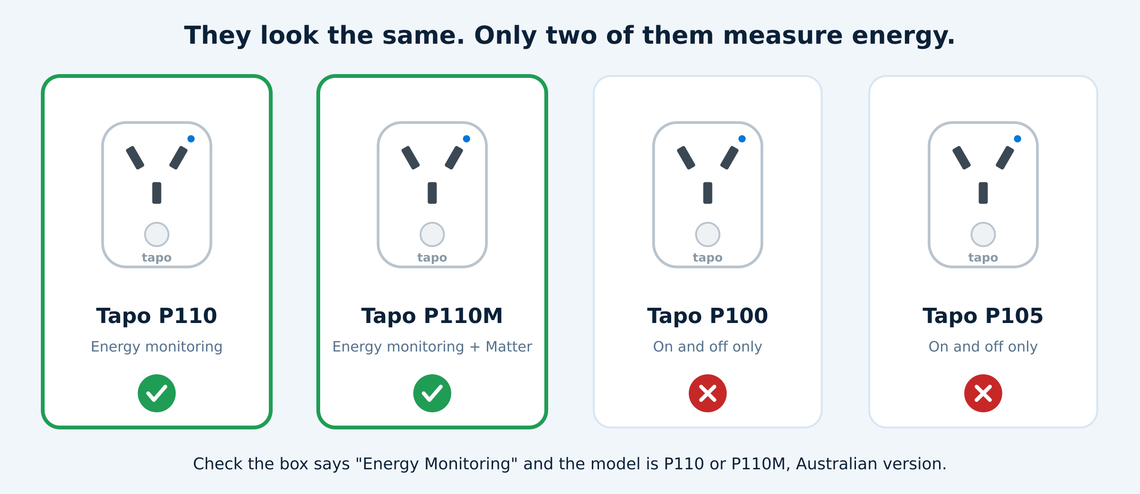
Buy the P110 or the P110M. Both measure energy. The P100 and P105 do not, even though they look the same and often sit on the shelf right beside them.
Check the box says "Energy Monitoring". It is in the product name on the packaging and on the Bunnings listing.
Buy the Australian version. It is made for our 230 volt supply, has an Australian plug, and carries the RCM mark (the Regulatory Compliance Mark, which shows it meets Australian electrical safety standards). Do not buy an overseas version online and use it with a travel adaptor.
P110 or P110M? The P110M does everything the P110 does and adds Matter, a common smart home standard that lets one device work with Apple Home, Google Home, Amazon Alexa, Samsung SmartThings and Home Assistant without separate apps. If you use any of those, or might, choose the P110M.
At Bunnings:
TP-Link Tapo P110 Mini Energy Monitoring Smart Plug (about $22)
TP-Link Tapo P110M Energy Monitoring Smart Plug, Matter compatible (about $22.90)
What it looks like
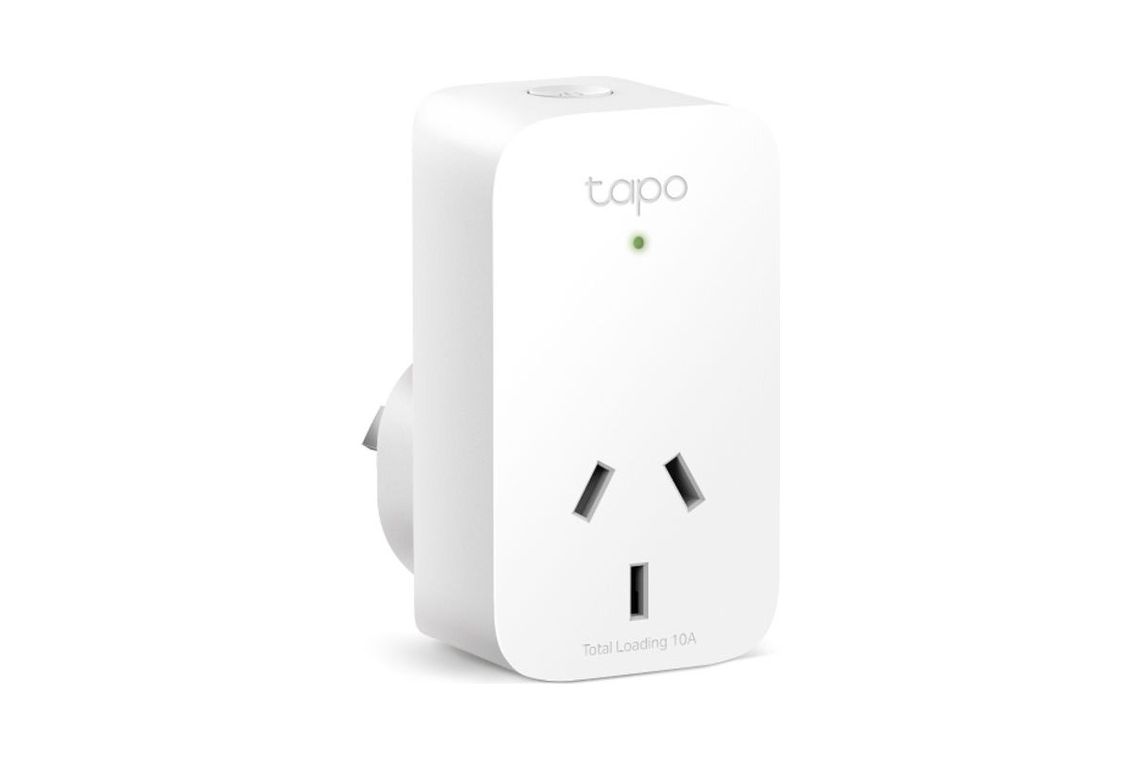
A small white plug: 76.5 mm high, 43.5 mm wide and 42 mm deep. It is slim enough that it does not block the socket next to it on a double power point.
An Australian socket on the front for the appliance, a button that switches it by hand, and a small light that shows whether it is on and connected.
How it connects
Plug the P110 into the power point, switch the power point on, and plug the appliance into the P110.
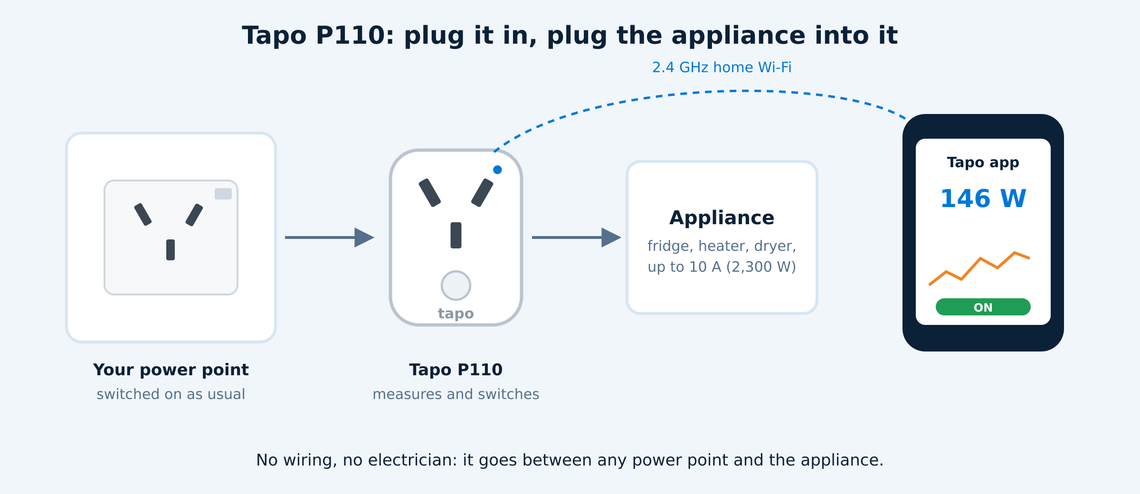
Set it up with the Tapo app on your phone. The app finds the plug and puts it on your home Wi-Fi in a couple of minutes.
It needs 2.4 GHz Wi-Fi (the longer range band most routers provide alongside 5 GHz). It cannot join a 5 GHz only network.
No hub is needed. Each plug talks to your Wi-Fi directly.
What it does
Measure
Power right now, in watts (W): what the appliance is drawing this moment.
Energy over time, in kilowatt hours (kWh), the unit your power bill charges for: today, this week and this month, with graphs.
What it costs: enter your price per kWh from your bill and the app estimates the cost.
Control
Switch it on and off from your phone, wherever you are, or by voice with Amazon Alexa or Google Assistant.
Schedules (on at 10 am, off at 3 pm), timers (off again in two hours) and away mode (switches a lamp on and off at random while you are away).
Power protection: set a limit in watts, and the plug switches off if the appliance goes over it. It also has built-in overload protection.
Know its limits
10 amps, 2,300 watts at most. Check the rating plate on the appliance. Some large heaters, kettles and dryers are rated at 2,400 watts, which is more than the plug is rated for.
Plug-in appliances only. Anything wired straight into the house, such as a hot water system, an oven, ducted air conditioning or a hard-wired pool pump, cannot use a plug. Those need a device installed by an electrician, such as the Shelly PM Mini and Pro PM range.
Indoors and dry. It is rated for use between 0 and 40 degrees, not outside or in the wet.
Using it to monitor and control your energy
Find out what the old fridge costs. A week on a P110 shows exactly what a second fridge or a beer fridge in the garage uses. Many cost more a year than people expect.
Catch standby power. Put the TV cabinet, the computer desk or the gaming console on a P110 and see what it draws when everything is "off". Switch it off overnight with a schedule.
Run things on your own solar. Schedule a dehumidifier, a plug-in pool pump or an e-bike charger for the middle of the day, when your panels are making more than the house uses and you would otherwise export it for a few cents.
Stay out of the peak. On a time of use plan, set anything that can wait to run outside the expensive hours, typically 4 pm to 9 pm.
Cost a heater or an electric blanket. See what an evening of it really adds to the bill, then decide.
Tapo P110 or Shelly?
Tapo P110 | Shelly PM and Pro PM | |
|---|---|---|
Installation | Plug it in yourself | Licensed electrician |
Works with | Plug-in appliances | Hard-wired appliances and whole circuits |
Maximum | 10 A (2,300 W) | 16 A a circuit |
Cost | About $22 | More, plus installation |
Best for | Starting out, and checking individual appliances | Permanent monitoring and control of fixed loads |
Where EnergyPilot fits
A plug like this shows you where the power goes. The saving comes from acting on it every day: running the right loads at the right time, without anyone having to remember. That is what EnergyPilot does across the whole home. If you would like help working out which appliances are worth measuring and controlling, talk to us.
Specifications are from TP-Link's Australian product information and Bunnings' listings as at October 2026. Prices and models change; check the model and the box before you buy.