
Hot water on spare solar: a Shelly, a contactor and your Sigen system
An electric hot water cylinder is one of the biggest loads in most homes, and it is also the easiest one to move. It is a tank of stored heat: it does not matter when the water is heated, only that it is hot when you need it. So instead of heating it overnight or in the evening peak, heat it in the middle of the day with solar you would otherwise export for a few cents.
On a Sigen (Sigenergy) solar and battery system this is done with a Shelly smart switch, set up as a smart load in the mySigen app, and a contactor that does the heavy lifting. This page explains why the contactor matters, what gets installed, and how to set it up.
Why a contactor?
A typical cylinder element is 3.6 kilowatts (kW). At 240 volts that is about 15 amps, and it draws that continuously for hours while the tank heats. A Shelly's own relay is rated at 16 amps: it would be running at its limit, for hours, every day. That is a recipe for heat and worn contacts.
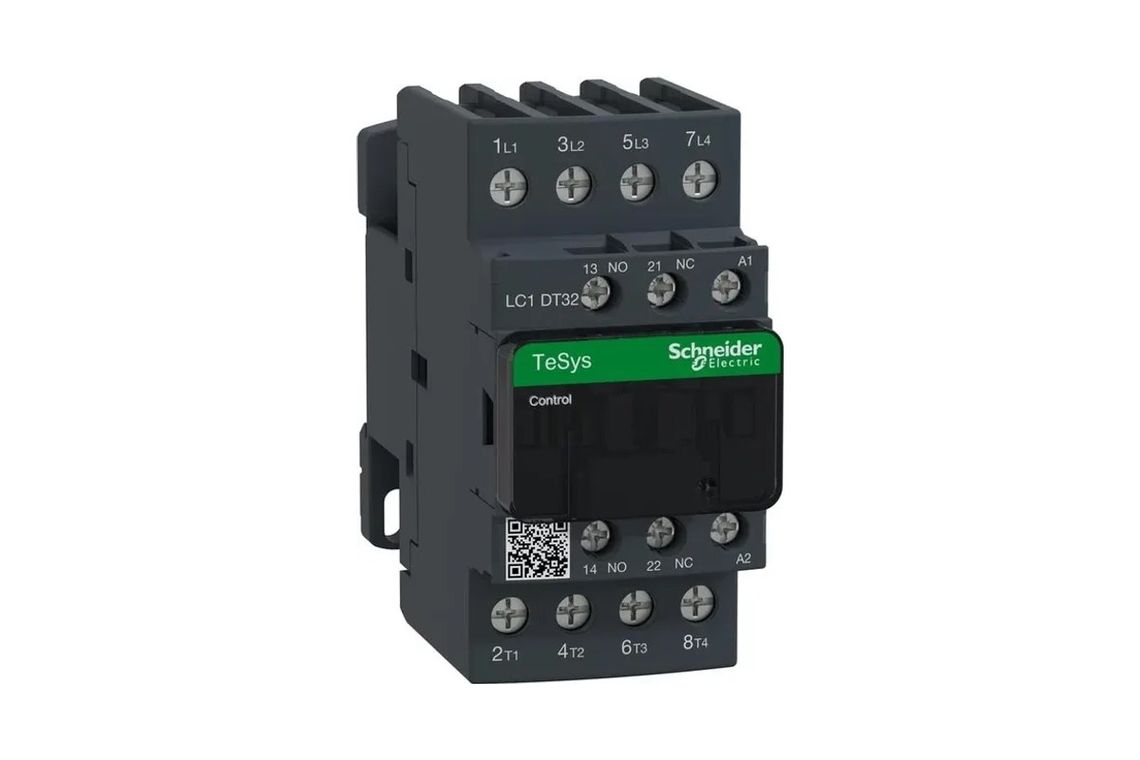
A contactor is a heavy duty switch made for exactly this. It sits in the switchboard and carries the element's current. The Shelly only switches the contactor's coil, a circuit drawing a few watts, so it is working nowhere near its limit. Choose a contactor rated for resistive loads like heating elements (an AC-1 rating) comfortably above the element, for example 25 or 32 amps, with at least two poles so it switches both active and neutral.
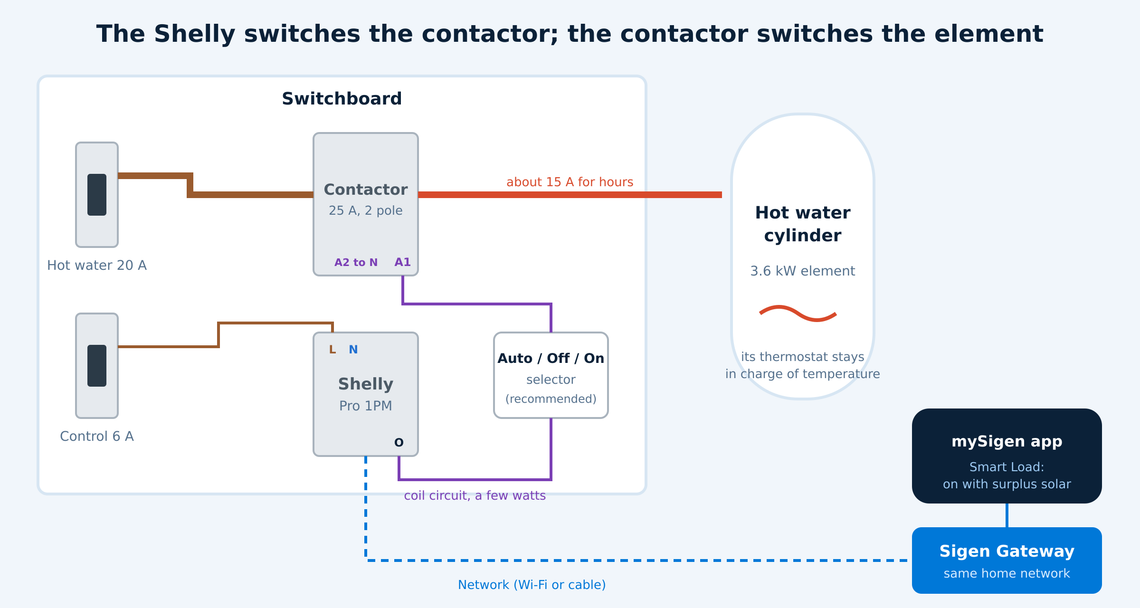
The cylinder's own thermostat and over-temperature cut-out stay exactly as they are. The contactor only decides whether the element may heat; the thermostat still decides when the water is hot enough.
What gets installed
All of this is fixed wiring in the switchboard, so it is a job for a licensed electrician.
A Shelly to switch the coil: a Shelly Pro 1PM on the DIN rail (the standard switchboard rail) is the tidy choice, on its own small circuit breaker.
A contactor: DIN rail mounted, AC-1 rated above the element current, two pole.
An Auto / Off / On selector switch (recommended): Auto lets the Shelly and Sigen decide, On forces the heating on, and Off isolates it. Handy for a cloudy week, or for anyone servicing the cylinder.
A network connection: the Shelly must be on the same home network as your Sigen Gateway, by Wi-Fi or by a network cable.
One thing to know about measuring: because the Shelly switches the coil, the power it reports is the coil's, a few watts, not the element's. Your Sigen system already sees the whole house. To see the cylinder on its own, your electrician can add a clamp meter such as the Shelly Pro EM on the hot water circuit.
Two things to check first
Is your cylinder on a controlled load tariff?
Many Queensland homes heat hot water on a controlled load tariff (Tariff 31 or 33): a cheaper rate on a separate part of the meter, where the network decides when the power is on, mostly overnight. That supply cannot follow your solar. To heat on solar, your electrician moves the cylinder onto the main household circuit, and your retailer may need to update your meter and plan. Heating from your own solar is effectively free, but any top-up from the grid is then at your general rate rather than the controlled load rate, so it is worth checking the numbers first. We can do that with you.
It still has to get properly hot
Stored hot water must be heated to at least 60 degrees regularly to control Legionella bacteria, as the Australian plumbing standard (AS/NZS 3500) requires. On a run of cloudy days, spare solar alone may not get it there. So always keep a backup: a time window each day when the cylinder heats regardless, for example late afternoon or in the overnight off-peak period, or the selector set to On when the weather turns.
Setting it up in the mySigen app
Install and connect the Shelly. Your electrician installs the Shelly and contactor. The Shelly needs to be powered and, ideally, already on your home Wi-Fi or network cable.
Add it as a smart load. In mySigen choose Add device, then Smart Load. Pick WLAN if the Shelly is already on your network, or Bluetooth for a new one that is not yet on Wi-Fi.
Select it and name it, for example "Hot water".
Choose critical or non-critical. Non-critical is usually right for hot water: in a blackout it switches off, so the cylinder does not drain your battery when you most need it.
Choose how it runs. Smart loads can be controlled manually, on a schedule, or switched on automatically when there is surplus solar. For hot water, choose surplus solar and set the switch-on point to about the element's power (for example 3,600 watts), so it only starts when there is enough spare to run it. Decide whether the battery or the hot water gets first call on the solar.
Set the backup, so the water reaches 60 degrees every day whatever the weather: a time window in the app, a schedule on the Shelly, or the selector switch. Your electrician or we can set this to suit your system.
Test it. On a sunny morning, watch the smart load switch on in the app once the solar surplus passes the switch-on point, and listen for the contactor clicking in the switchboard.
A Sigen system can manage up to 24 smart loads. A Shelly with several outputs, such as the Pro 2PM or Pro 4PM, is set up one channel at a time, so the same approach works for a pool pump or a second cylinder.
What it can save
An example, with assumptions you can swap for your own: a family uses 8 kWh (kilowatt hours) a day heating water.
Heated from | Price per kWh | Per day | Per year |
|---|---|---|---|
Grid, general rate | 30c | $2.40 | $876 |
Grid, controlled load | 20c | $1.60 | $584 |
Your own spare solar | 5c (the export credit you give up) | $0.40 | $146 |
In that example, heating on solar saves about $730 a year against the general rate, or about $440 against controlled load, less whatever the backup heating draws from the grid in winter. Your own figures depend on your tariff, your solar and your household.
Where EnergyPilot fits
Hot water is usually the first load we move, because it is big, flexible and pays back quickly. EnergyPilot works out the right settings for your tariff and solar, and keeps the cylinder hot, safe and cheap to run across the seasons, alongside your battery, air conditioning and other loads.
The mySigen steps follow Sigenergy's and Shelly's published guides as at October 2026; menu names can change between app versions. Related: Shelly PM Mini and Pro PM.